
Cloud security teams rarely have a shortage of scanners. The harder problem is turning findings from cloud infrastructure, containers, Kubernetes, code, identities and workloads into something teams can actually act on. Palo Alto Networks' State of Cloud Security Report 2025 found that organizations were managing an average of 17 security tools from five vendors, while 97% prioritized consolidating their security footprint.
That consolidation is what CNAPP aims to provide. Open source makes the picture more complicated: there are a few broad platforms, but many teams build their own CNAPP stack from specialized tools. This guide covers both approaches.
Disclosure: Offload Security publishes this guide and maintains offload-cli, one of the tools listed. Project details are as published by each project at the time of writing (November 2026); check each project for current features and licensing.
What is an open source CNAPP?
A Cloud-Native Application Protection Platform, or CNAPP, brings multiple cloud security functions into a common workflow. Depending on the platform, that can include cloud security posture management (CSPM), Kubernetes security posture management (KSPM), workload protection, vulnerability management, IaC scanning, identity risk, container security, compliance and runtime monitoring. If the acronyms are new, our explainer on CSPM vs CNAPP vs CWPP walks through each layer.
An open source CNAPP should therefore do more than run one type of scan. That distinction matters. Trivy, Falco, ScoutSuite and kube-bench are useful open source security tools, but individually they are not complete CNAPPs. They cover specific layers of the wider CNAPP model.
The tools below either provide broader CNAPP coverage or cover enough of the cloud-native security lifecycle to be relevant when building an open source CNAPP stack.
Best open source CNAPP tools: quick comparison
| Tool | Best suited for | Main coverage | Open source scope |
|---|---|---|---|
| Offload Security + offload-cli | OSS developer scanning with an upgrade path to centralized security operations | Secrets, SCA, SBOM, IaC; the broader platform adds CSPM, Kubernetes, containers and risk | offload-cli is Apache 2.0; the full platform is commercial |
| Deepfence ThreatMapper | Broad production cloud-native security | Vulnerabilities, cloud posture, workloads, Kubernetes, attack paths | Apache 2.0 platform |
| Prowler | Multi-cloud posture and compliance | CSPM, Kubernetes, IaC, compliance, risk | Open source CLI and Local Server |
| Kubescape | Kubernetes-heavy environments | KSPM, image vulnerabilities, runtime, policy and compliance | Apache 2.0 |
| Wazuh | Workload, endpoint and runtime visibility | XDR, vulnerabilities, containers, cloud monitoring, compliance | Free and open source |
1. Offload Security + offload-cli
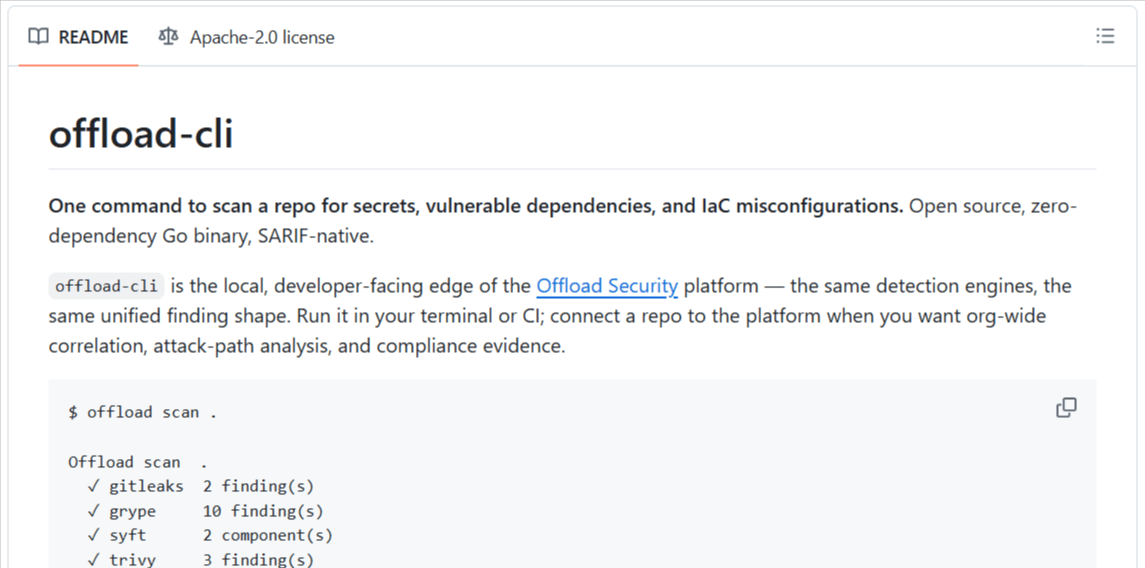
Offload Security + offload-cli takes a slightly different open source model. Its offload-cli is an Apache 2.0 developer security scanner, while the wider Offload Security platform is commercial. To be clear, the full platform is not open source. The open source CLI provides the developer-facing scanning layer and can be used independently without signing up for the platform.
The commercial platform expands this into CSPM across AWS, Azure and GCP, container and Kubernetes security, vulnerability management, attack path analysis, compliance, threat intelligence and centralized reporting. It can run on-premises in your own environment or as SaaS.
Features of offload-cli
- Gitleaks for secrets detection.
- Syft for CycloneDX SBOM generation.
- Grype for software composition analysis and vulnerable dependencies.
- Trivy for Terraform, Kubernetes, CloudFormation and Dockerfile misconfigurations.
- Deduplicated findings with table, JSON and SARIF output.
- Severity thresholds for CI pipelines, plus a GitHub Action.
Why choose Offload Security?
This model suits teams that want to start with open source developer scanning without immediately introducing another centralized platform. Local findings use the same finding structure as the broader platform, creating a path from repository-level scanning to centralized cloud and security governance later.
Things to consider
The open source portion does not provide the complete Offload CNAPP. Centralized attack paths, cross-environment correlation, compliance evidence and organization-wide risk management belong to the commercial platform. Platform pricing is scoped to the deployment model and connected environments rather than published as a fixed self-service price; see pricing.
2. Deepfence ThreatMapper
Deepfence ThreatMapper is one of the clearest examples of a project explicitly built as an open source CNAPP. It monitors production infrastructure across cloud, Kubernetes, serverless, containers and on-premises environments, and combines cloud scanning with workload sensors.
Features of ThreatMapper
- Identifies vulnerable software, exposed secrets and security configuration issues.
- Cloud Scanner tasks query provider APIs and check configurations against compliance benchmarks.
- Sensor agents support Kubernetes, Docker, Amazon ECS, Fargate and virtual machines.
- ThreatGraph connects findings and highlights higher-risk paths.
- Available under the Apache 2.0 license.
Why choose ThreatMapper?
ThreatMapper makes sense for teams that want more than posture scanning. It reaches into running workloads and provides a centralized management console, which gives it broader CNAPP coverage than most standalone open source scanners.
Things to consider
That breadth also increases deployment effort. ThreatMapper uses a management console, cloud scanner tasks and workload sensors, so teams should expect more infrastructure and operational ownership than with a simple CLI scanner.
3. Prowler
Prowler has evolved from a cloud security assessment tool into a broader open source cloud security platform. Its open source offering includes both a CLI and Prowler Local Server (formerly Prowler App), a self-hosted web application for running assessments and reviewing findings. Official support covers AWS, Azure, GCP, Kubernetes and GitHub, and IaC scanning can also run through CI workflows.
Features of Prowler
- Multi-cloud security posture assessments.
- Kubernetes security checks.
- A large compliance and benchmark library.
- Risk prioritization and remediation guidance.
- Web UI, API and CLI interfaces.
- IaC scanning through CI/CD.
- Self-hosted open source deployment.
Why choose Prowler?
Prowler is particularly useful when cloud posture, compliance and configuration risk are the main priorities. Local Server also removes a traditional limitation of CLI-only CSPM projects by giving teams a central interface.
Things to consider
Prowler covers an increasingly broad set of cloud security use cases, but its center of gravity remains posture, assessment and compliance. Organizations needing deep host-level runtime detection may still pair it with a runtime-focused tool.
4. Kubescape
Kubescape is an open source Kubernetes security platform and a CNCF incubating project. Rather than trying to secure every cloud service, it focuses deeply on Kubernetes, from development through runtime.
Features of Kubescape
- Kubernetes and manifest misconfiguration scanning.
- CIS, NSA-CISA and MITRE ATT&CK-based assessments.
- Container image vulnerability scanning using Grype.
- Automatic remediation for some manifest issues.
- Admission-control policies.
- eBPF-based runtime monitoring.
- Continuous in-cluster scanning through its operator.
Why choose Kubescape?
For teams whose cloud-native footprint is primarily Kubernetes, Kubescape covers several CNAPP functions without separate KSPM, image scanning and runtime tools.
Things to consider
Its specialization is also its main boundary. Kubescape is not intended to replace broad AWS, Azure or GCP posture management across cloud services outside Kubernetes.
5. Wazuh
Wazuh is better known as an open source XDR and SIEM platform than as a CNAPP. However, its workload, vulnerability, container and cloud-monitoring capabilities make it relevant to the workload-protection side of an open source CNAPP stack. Wazuh protects on-premises, virtualized, containerized and cloud-based workloads and includes vulnerability detection, compliance monitoring, configuration assessment and container visibility.
Features of Wazuh
- Endpoint and workload threat detection.
- Vulnerability detection.
- Configuration assessment.
- Cloud-provider security-data collection.
- Docker monitoring and container threat detection.
- Compliance dashboards and security event analysis.
Why choose Wazuh?
Wazuh is useful when runtime, hosts, endpoints and operational security matter as much as cloud configuration. It can fill areas that posture-focused open source tools do not address.
Things to consider
Wazuh should not be treated as a complete CNAPP replacement. Its strengths are host and workload telemetry; broad cloud posture management across services and identity entitlement analysis (CIEM) sit outside its core and usually come from other tools.
Open source CNAPP tools by capability
A full CNAPP is not always necessary. Teams can also combine specialized open source projects, particularly when they already know which security layer they need to improve.
| CNAPP capability | Open source tools | Best used for |
|---|---|---|
| CSPM | Prowler, ScoutSuite, CloudSploit | Cloud configurations, exposure and compliance. ScoutSuite provides point-in-time multi-cloud auditing, while CloudSploit detects configuration risks across AWS, Azure, GCP and OCI. |
| KSPM | Kubescape, Polaris, kube-bench | Kubernetes posture and policy. Polaris validates and can remediate workload configuration; kube-bench focuses on CIS Kubernetes Benchmark checks. |
| Container & vulnerability security | Trivy, Grype, ThreatMapper | Images, dependencies and known vulnerabilities. Trivy can also inspect repositories for vulnerabilities, secrets and misconfigurations, while Grype scans images, directories and SBOMs. |
| IaC security | Checkov, KICS, Trivy | Finding insecure infrastructure before deployment. Checkov and KICS both support infrastructure-as-code security checks across common cloud formats. |
| Runtime security | Falco, Tetragon, KubeArmor | Monitoring and controlling workload behavior. Falco focuses on runtime detection, Tetragon adds eBPF-based observability and enforcement, and KubeArmor applies workload-hardening policies. |
This composable approach can work well, but every additional tool creates another set of findings, policies, integrations and reports that somebody must operate.
One CNAPP platform or multiple open source tools?
The choice comes down to integration versus specialization.
Combining tools such as Prowler, Kubescape, Trivy and Falco lets a team choose a strong project for each layer. It also keeps the architecture flexible and avoids committing everything to one platform.
The trade-off is operational work. Each tool may have a different finding format, severity model, dashboard and remediation process. Practitioners looking for open source CNAPPs repeatedly describe the same reality: broad coverage often means stitching CSPM, KSPM and workload tools together.
A broader platform becomes more attractive when the difficult part is no longer finding issues, but correlating, prioritizing, assigning, reporting and proving that they were resolved.
How to choose an open source CNAPP tool
Start with coverage, not the number of features on a product page. A Kubernetes-focused company may gain more from Kubescape than from a broad CSPM scanner, while a multi-cloud organization may care more about Prowler's provider and compliance coverage.
Next, consider operational overhead. Open source removes software licensing costs, but infrastructure, upgrades, integrations and ongoing ownership still take time.
Examine prioritization and remediation. Finding thousands of misconfigurations is less useful if the tool gives little help deciding what matters first.
Finally, check project health: activity, documentation, deployment model, integrations, and whether you have a realistic path to support if the tool becomes business-critical. For a commercial evaluation checklist, see how to choose a CNAPP solution, and for commercial platforms, our CNAPP buyer's guide.
Frequently asked questions
Are there fully open source CNAPP platforms?
Yes, but there are fewer mature open source projects with broad CNAPP coverage than there are specialized CSPM, Kubernetes, vulnerability and runtime tools. ThreatMapper is one example explicitly maintained as an open source CNAPP.
Can I build a CNAPP entirely from open source tools?
Yes. An organization could combine CSPM, KSPM, vulnerability scanning, IaC scanning and runtime tools. The main challenge is integrating their data and workflows rather than obtaining the individual security capabilities.
What is the difference between CSPM and CNAPP?
CSPM focuses primarily on cloud configuration, posture and compliance. CNAPP is broader and normally combines CSPM with other capabilities such as workload protection, Kubernetes security, identity, vulnerabilities and development-time security.
Can open source CNAPP tools replace commercial CNAPP platforms?
For some environments, yes. The practical difference is often not detection coverage but the surrounding operational layer: correlation, reporting, support, automation, attack paths, enterprise integrations and cross-team workflows.
Conclusion
Open source CNAPP is less about finding one project that does everything and more about deciding how much consolidation you actually need.
- ThreatMapper provides broad open source CNAPP coverage.
- Prowler is especially strong for cloud posture and compliance.
- Kubescape provides deep Kubernetes-focused security.
- Wazuh can strengthen workload and runtime visibility.
- Specialized projects such as Trivy, Falco, Checkov and ScoutSuite make it possible to assemble a security stack around specific requirements.
Offload Security takes a hybrid approach: teams can start with the Apache 2.0 offload-cli for repository scanning and move to the wider platform when they need centralized cloud, Kubernetes, vulnerability, attack-path, compliance and reporting workflows.
If that model fits your environment, try offload-cli first, and evaluate the broader Offload Security platform when centralized governance becomes useful. Book a demo when you get there.