
Security Scanning & Reporting
Orchestrate proven security tools across every target — then report for executives, engineers, and auditors.
Can one platform run all security scanners and produce audit-ready reports?
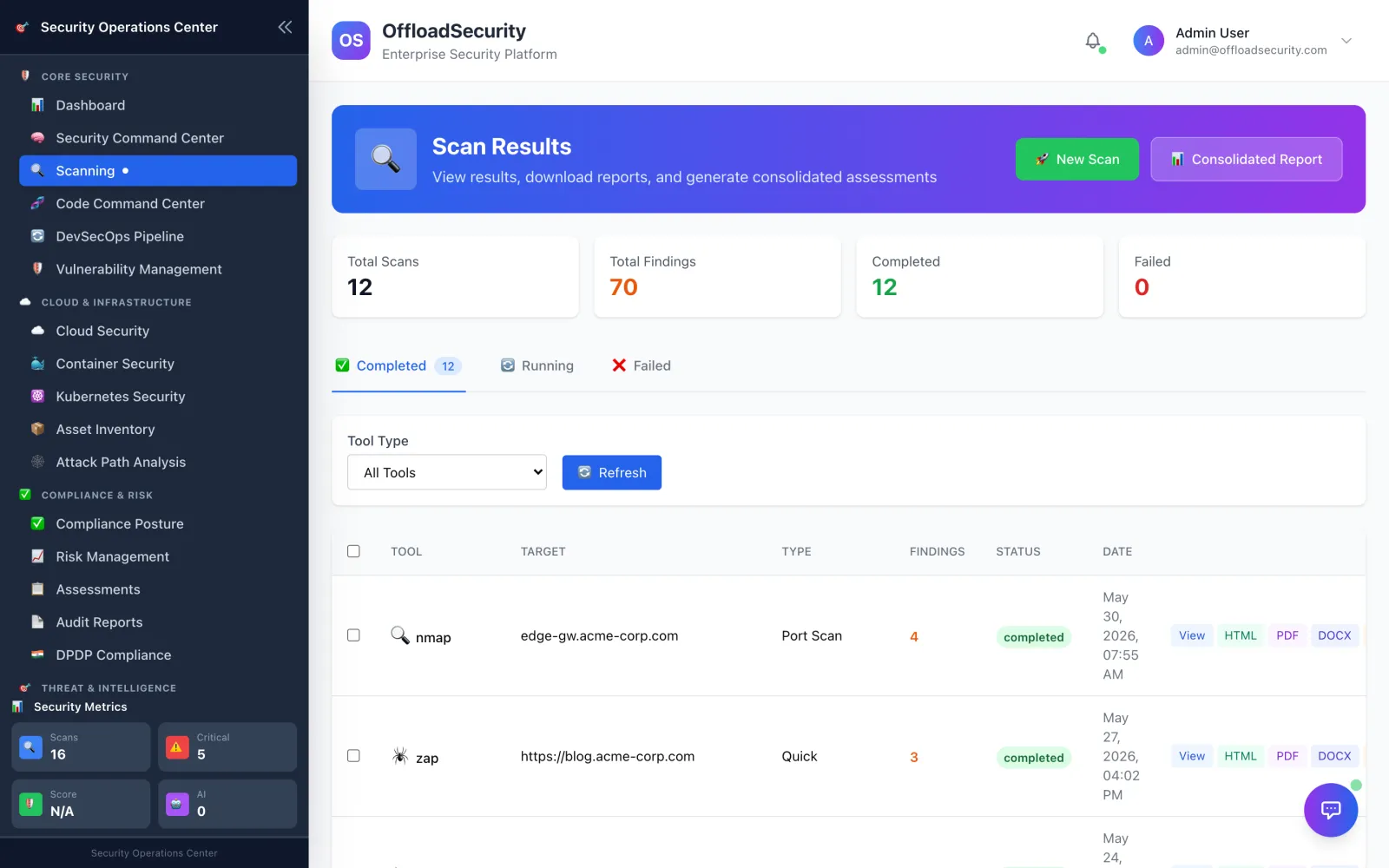
The scanning engine runs proven, best-of-breed security tools against every target type — web, API, network, TLS, code, IaC, containers, Kubernetes, and cloud — normalizes their output into one canonical finding model, and generates professional, multi-format reports for executives, engineers, and auditors.
Security Scanning & Reporting in the Offload Platform
What this replaces
Every scanner speaks its own dialect: different output formats, different severity scales, different report styles. Stitching them into one credible answer — and a report a board or auditor will accept — is a manual slog nobody has time for.
What Offload does
The scanning engine runs proven, best-of-breed security tools against every target type — web, API, network, TLS, code, IaC, containers, Kubernetes, and cloud — normalizes their output into one canonical finding model, and generates professional, multi-format reports for executives, engineers, and auditors.
What you get
- Multi-tool orchestration per target: Nuclei and OWASP ZAP for web; Nmap-family and TLS analysis for network and certificates; an OWASP API Top-10 scanner for APIs; OpenGrep, Bandit, and osv-scanner for code; Checkov for IaC; Trivy, Grype, and Syft for containers and SBOMs; Prowler for cloud; kube-bench, Kubescape, Polaris, and kube-hunter for Kubernetes
- Isolated execution: each scanner runs in a single-use, resource-capped container with dropped capabilities — never installed into the platform runtime
- Cross-tool normalization into one canonical finding shape, with severity normalized across tools that grade differently
- Standards coverage mapping to OWASP Top 10, OWASP API Top 10, OWASP ASVS, and NIST SSDF — with a coverage matrix and security rating
- Exploit and threat enrichment: CISA KEV, EPSS, and MITRE ATT&CK context on findings
- Professional reports in PDF, HTML, DOCX, CSV, and JSON — executive, technical, and compliance/audit variants
- Reports include an executive summary, per-finding detail with evidence and remediation, charts, compliance mapping, a scan-coverage matrix, and the exact tool versions used
- Scheduled, recurring scans via a persistent scheduler, plus on-demand report generation
- Optional AI-assisted analysis and narrative enrichment, using your own model-provider key
How it works
A scan request resolves the target to its tool set and dispatches each scanner as an isolated container job. For a single web or application target, tools run through a phased pipeline — reconnaissance, discovery, testing, post-processing — paced for stability rather than overwhelming the target.
As tools complete, a normalizer collapses their varied output into one finding model, normalizes severities, maps to standards, and enriches with KEV/EPSS/MITRE. A report engine renders the result through a shared professional template into the format each audience needs.
One platform, one risk view
Scan findings flow into the unified vulnerability queue and risk register, feed compliance evidence, and drive executive dashboards — one scanning and reporting layer shared across cloud, code, container, and Kubernetes security.
Ready to implement it?
Step-by-step guides in the product documentation — every connection is read-only, with copy-paste setup.
Solutions built on Security Scanning & Reporting
MSSPs & Consultancies
Multi-tenant by design: run each client as an isolated team, standardize your delivery on one platform across cloud, code, containers and compliance, and hand clients executive reporting that maps findings to the frameworks they report on.
Consolidate scanner findings
Feed every scanner you run — and the tools you already own — into one normalized, de-duplicated queue with ownership, SLAs and history, so your team spends its time reducing risk instead of preparing data.
Automate compliance evidence
Back controls with live technical findings, collect evidence as scans run, and generate audit packs on demand — so your compliance posture reflects the real environment instead of a parallel spreadsheet.
Pass customer security reviews
Answer security questionnaires from an approved knowledge base with linked evidence, and share module whitepapers from the Trust Center — so procurement reviews stop blocking the deal.
Executive cyber-risk dashboard
One live view of posture across cloud, code, containers and compliance — risk score, top findings, framework coverage and trend — so leadership gets the answer from real data, not a manually assembled deck.
Other modules on the platform
Security Scanning & Reporting — frequently asked questions
Which scanners does Offload Security orchestrate?
Nuclei and OWASP ZAP for web, Nmap-family and TLS analysis for network, an OWASP API Top-10 scanner, OpenGrep/Bandit/osv-scanner for code, Checkov for IaC, Trivy/Grype/Syft for containers, Prowler for cloud, and kube-bench/Kubescape/Polaris/kube-hunter for Kubernetes.
What report formats does Offload produce?
Professional reports in PDF, HTML, DOCX, CSV and JSON — with executive, technical and compliance/audit variants, including evidence, remediation, charts, compliance mapping and the exact tool versions used.
Are the scanners installed into the platform?
No. Each scanner runs in an isolated, single-use, resource-capped container with dropped capabilities — never installed into the platform runtime.